DistroKid Review 2026: Is It Worth It for Indie Artists?
Okay, I'll admit this one's a little outside my usual "here's how to configure your Nginx reverse proxy" content. But hear me out.

Okay, I'll admit this one's a little outside my usual "here's how to configure your Nginx reverse proxy" content. But hear me out.
A surprising number of developers I know are also musicians, beat makers, or podcasters on the side. We spend all day building things for other people, and then at night we go home and… build more things except these ones have bass lines. And if that's you, you've probably hit the same wall: you've got music sitting on your hard drive that literally no one can hear because you have no idea how to get it onto Spotify, Apple Music, or YouTube Music without handing a large cut of your royalties to a label that doesn't even know your name.
That's exactly the problem DistroKid was built to solve. In this post, I'm going to walk you through what it is, how it works, who it's realistically a good fit for, and a few things to watch out for, no hype, no empty promises, just a practical breakdown from someone who appreciates tools that actually do what they say on the tin.
What Is DistroKid and Why Does It Exist?
Before streaming platforms, getting your music in front of listeners meant either signing to a label or pressing physical copies and hoping for the best. Today, the barrier is much lower, but there's still a gate: digital stores like Spotify, Apple Music, Tidal, and Amazon Music don't let independent artists upload directly. You need what's called a music distributor to act as the intermediary.
DistroKid is one of those distributors. You upload your music to their platform, they push it out to 150+ streaming services and stores worldwide, and your royalties flow back to you. What makes DistroKid stand out in a fairly crowded space (competitors include TuneCore, CD Baby, and DistroVid/Mixea) is its pricing model: you pay a flat annual fee rather than giving up a percentage of your earnings.
That's a meaningful distinction. If your music starts generating real income, you're not watching a cut disappear to your distributor every time someone streams your track.
How DistroKid Actually Works
Here's the basic flow, which, as a developer, I appreciate for being relatively clean:
1. Sign Up and Choose a Plan
DistroKid offers a few tiers, starting with their entry-level plan. You can get started here: 👉 Join DistroKid
If you're a student, there's a discounted plan specifically for you: 👉 DistroKid Student Discount
It's worth checking both pages to see which applies to your situation, since the student pricing can make a noticeable difference if you're early in your journey.
2. Upload Your Music
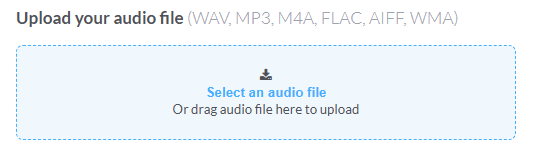
Once you're in, uploading is straightforward. You'll need:
- Your audio file (WAV or FLAC recommended for best quality, MP3 is accepted but less ideal)
- Album/single artwork (3000×3000px, RGB, JPG or PNG)
- Track metadata: title, artist name, genre, release date, ISRC (DistroKid can auto-generate this)
The interface walks you through each step. You can set a future release date, which is useful if you want to run pre-save campaigns before your track goes live.
3. Choose Your Stores
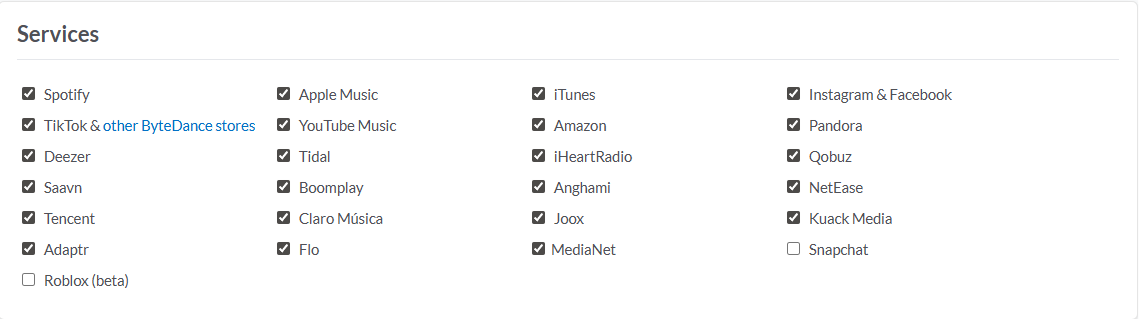
You select which platforms to distribute to. Spotify, Apple Music, YouTube Music, Tidal, Amazon Music, TikTok, Instagram/Facebook, the list is long. By default, most plans include all major platforms.
4. Collect Royalties
When people stream or download your music, royalties are collected and paid out to you. With DistroKid, you keep 100% of your earnings; the platform takes no percentage cut. Your earnings are accessible via their dashboard, and you can withdraw when you hit the minimum payout threshold.
What About Video Distribution?
DistroKid also has a video/content arm called DistroVid, which handles video distribution to platforms like Vevo. If you're creating music videos or visual content alongside your audio releases, that's worth exploring separately: 👉 Explore DistroVid / Mixea
Who Is DistroKid Actually a Good Fit For?
Let me be direct here, because I think this is where a lot of reviews get vague.
DistroKid works well if you are:
- An independent artist releasing music regularly (the flat fee model rewards volume)
- A developer, creator, or hobbyist who wants to put music out without complex label contracts
- Someone who wants fast distribution releases typically goes live within 24–72 hours after approval
- A student or early-career artist watching their budget (use the student link above)
- A producer who wants to release instrumentals or beats to streaming platforms
DistroKid may not be your best option if you are:
- Looking for physical distribution (CDs, vinyl), DistroKid is digital-only
- Expecting the platform to market your music for you, distribution and promotion are different things
- A one-time release artist who won't get ongoing value from an annual subscription
The annual subscription model means it only makes financial sense if you're releasing somewhat consistently. If you're putting out one track every three years, a per-release model like CD Baby might work out cheaper for you.
A Few Things to Know Before You Commit
I'm not going to pretend this is a perfect platform, because no tool is. Here are a few things worth being aware of:
1. It's subscription-based, not one-time. Your music stays on streaming platforms as long as your subscription is active. If you cancel, your releases will eventually be taken down. That's a meaningful detail if you're thinking long-term. There is also an option to leave your audios on streaming service even when you DistroKid subscription ends. Prices are shown in the images below.
Album:

Single:

2. Royalty collection can have a lag. Streaming royalties are not instant. There's typically a delay of a few months between a stream happening and the payment reaching your account. This is standard across the industry, not unique to DistroKid.
3. Store delivery times vary. While Spotify and Apple Music tend to be fast, some smaller stores or regional platforms can take longer. Plan your release date accordingly, especially if you want simultaneous availability everywhere.
4. Metadata matters more than most people think. Getting your artist name, track title, and ISRC codes right on the first upload saves you a lot of headaches later. Corrections are possible but can take time to propagate across platforms.
DistroKid vs. The Alternatives: A Quick Look
| Feature | DistroKid | TuneCore | CD Baby |
|---|---|---|---|
| Pricing Model | Flat annual fee | Annual per-release or subscription | One-time per release |
| Royalty Cut | 0% | 0% | 9% of streaming royalties |
| Stores Covered | 150+ | 150+ | 150+ |
| Speed | Fast (24–72h) | Moderate | Moderate |
| Student Discount | ✅ Yes | ❌ No | ❌ No |
| Video Distribution | ✅ (DistroVid) | ❌ | ❌ |
| Best For | Regular releasers | Per-project artists | First-timers, physical sales |
Note: Pricing and features across platforms change regularly. Always verify current details directly on each platform's website before committing.
Conclusion & Key Takeaways
If you've been sitting on music (or beats, or a soundtrack for that side project you never shipped), DistroKid is a legitimate and reasonably priced way to get it in front of listeners on the platforms they actually use.
Here's the quick summary:
- ✅ Flat-fee pricing means you keep 100% of your royalties; the model rewards output
- ✅ Fast distribution to 23+ platforms, including Spotify, Apple Music, TikTok, and more
- ✅ Student pricing available, worth checking if you qualify
- ✅ Video distribution via Mixea for visual content creators
- ⚠️ Subscription model: your releases depend on maintaining an active plan
- ⚠️ No built-in promotion, you still have to do your own marketing
Whether you're a full-time musician or a developer with a SoundCloud nobody knows about yet (guilty), the barrier to getting your audio onto major platforms has genuinely never been lower.
Ready to get started?
- 🎵 Standard plan Join DistroKid
- 🎓 Student discount DistroKid for Students
- 🎬 Video distribution DistroVid / Mixea
Have you used DistroKid or another distributor? I'm curious what your experience has been with getting music onto streaming platforms? Drop your thoughts in the comments below.